> ## Documentation Index
> Fetch the complete documentation index at: https://docs.goframe.dev/llms.txt
> Use this file to discover all available pages before exploring further.
# Agent rules, memory and voice
> Configure GoFrame Editor Agent in Settings → Agent: workspace and project rules, persistent memory and session notes, editing voice, permissions, usage and debug
**Settings → Agent** is where you tell the agent how to work for you: standing instructions, what it should remember, how it talks back, and when it may spend credits. Everything here is per workspace, so a team shares one set of rules while personal projects keep their own.
Open **Settings** from the account menu, then pick a section under **Agent**: **User Prompt**, **Memory**, **Editing Voice**, **Permissions**. Under **Advanced** you will find **Usage** and **Debug**.
## User Prompt: workspace and project rules
Rules are plain-English instructions the agent follows on every turn. There are two scopes:
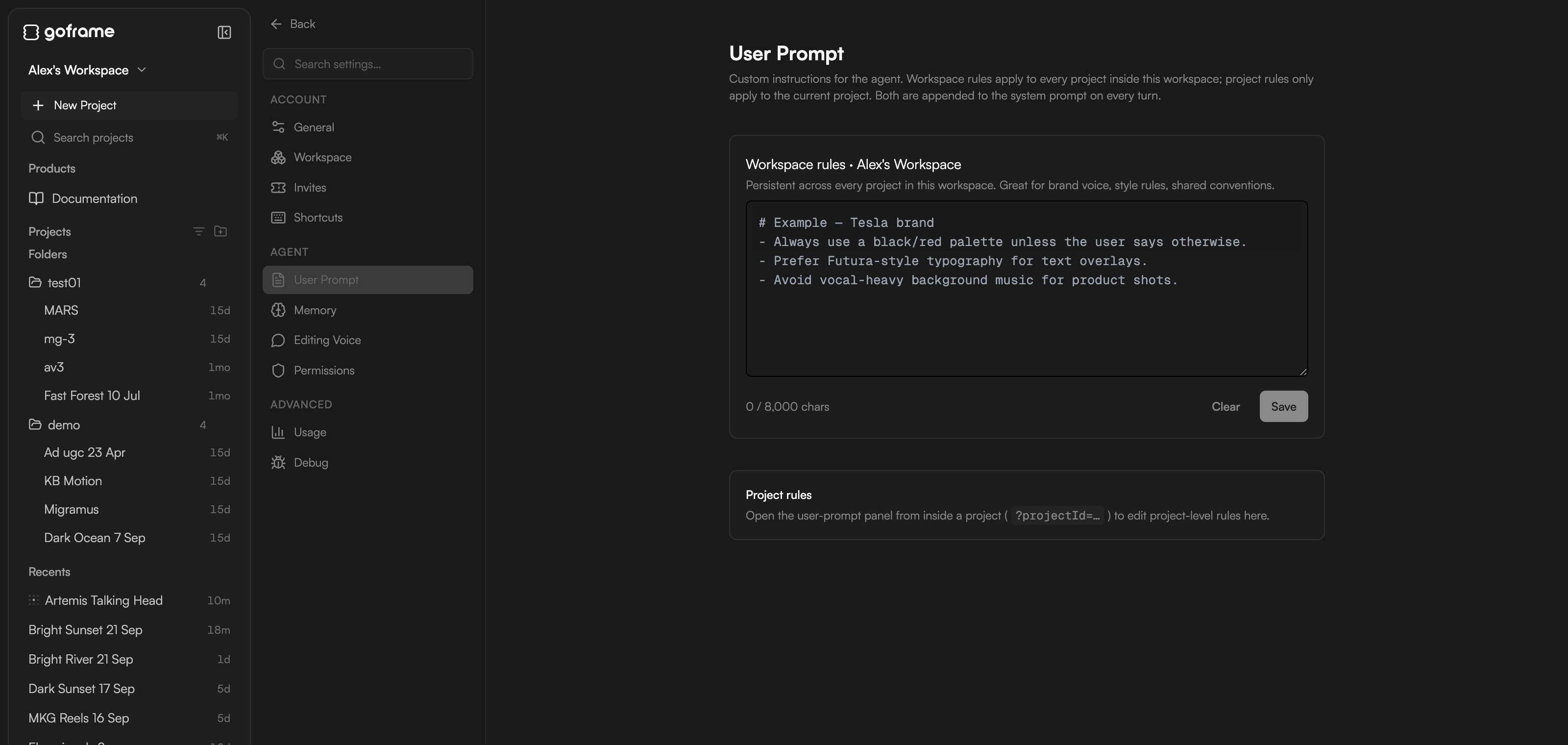
* **Workspace rules**: persistent across every project in this workspace. Use them for brand voice, style rules and shared conventions ("always keep captions under two lines", "never use stock music with vocals").
* **Project rules**: apply only to the current project. Use them for episode-specific instructions or one-off overrides ("this episode is 4:5 for Instagram").
Type into the box (up to 8,000 characters; a counter shows how much you have used) and click **Save**; **Clear** empties it. **Project rules** can only be edited from inside a project: opened from Home, the section says "Open the user-prompt panel from inside a project to edit project-level rules here."
 Rules are for things that should always hold. For one-off direction, just say it in the prompt. For preferences the agent should learn over time, use memory.
## Memory
Memory is what the agent keeps across sessions and projects. The agent writes entries itself as it learns about you and your work; you can also add, edit, pin or delete them here.
* **Workspace memory**: "N entries · shared across every project in this workspace" (brand facts, your role, house style).
* **Project memory**: scoped to one project (goals, deadlines, decisions made in this edit). Shown when you open Settings from inside a project.
Rules are for things that should always hold. For one-off direction, just say it in the prompt. For preferences the agent should learn over time, use memory.
## Memory
Memory is what the agent keeps across sessions and projects. The agent writes entries itself as it learns about you and your work; you can also add, edit, pin or delete them here.
* **Workspace memory**: "N entries · shared across every project in this workspace" (brand facts, your role, house style).
* **Project memory**: scoped to one project (goals, deadlines, decisions made in this edit). Shown when you open Settings from inside a project.
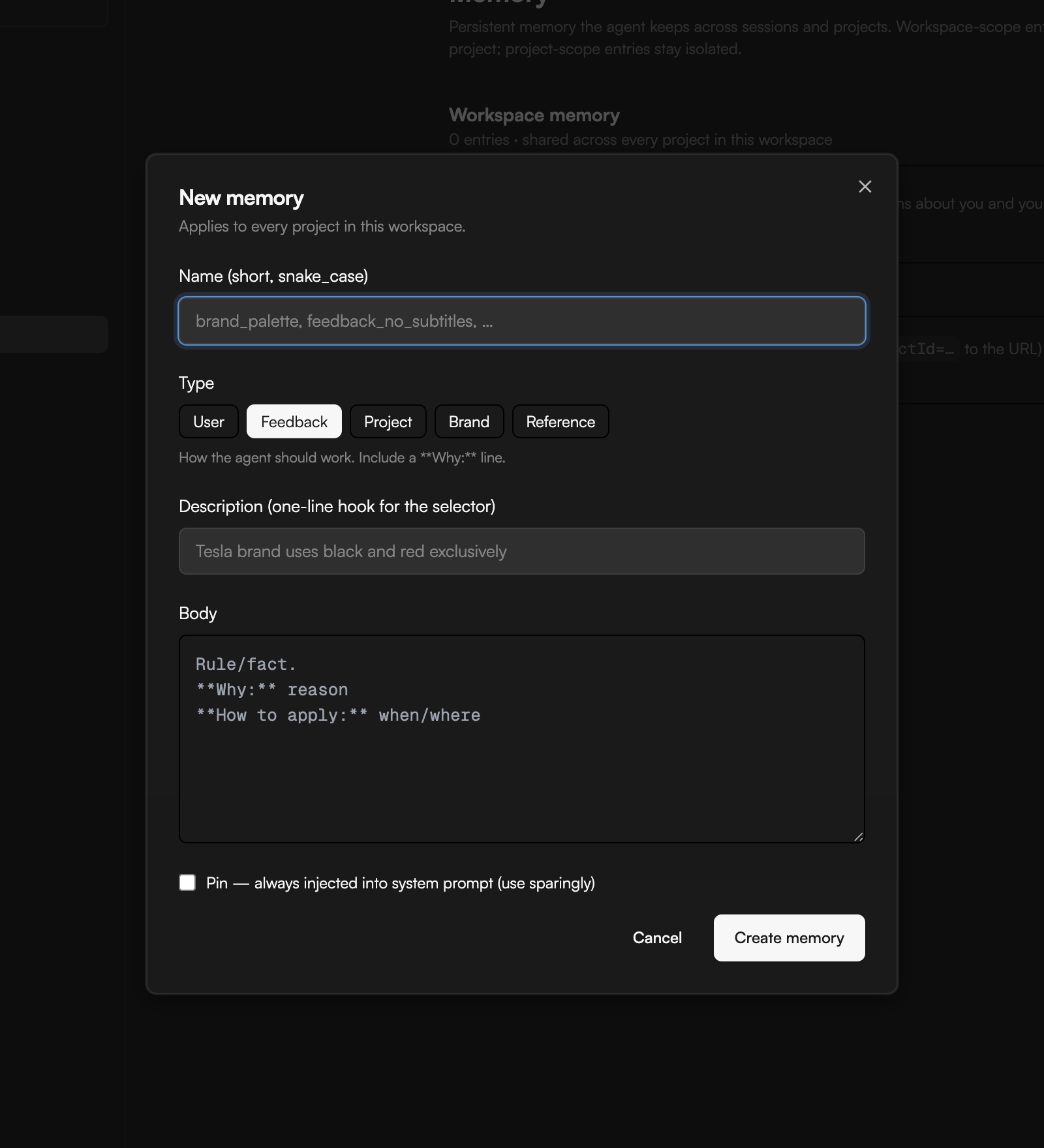
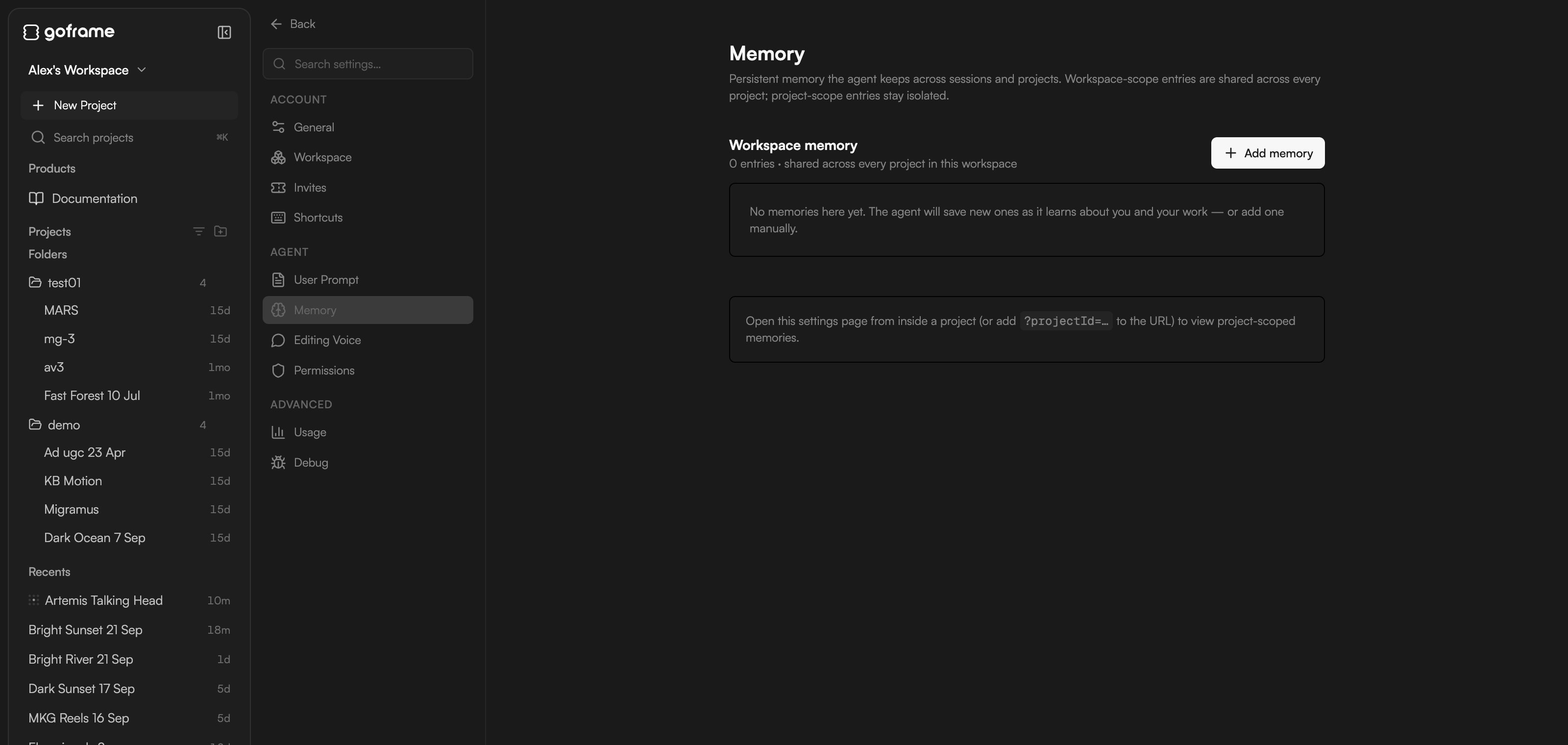 Click **Add memory** to create one. The **New memory** dialog asks for:
* **Name**: short, snake\_case, for example `caption_style`.
* **Type**: **User** (a stable fact about you: role, responsibilities, preferences), **Feedback** (how the agent should work, with a "Why:" line), **Project** (ongoing work facts, goals, deadlines), **Brand** (voice, palette, typography, approved references) or **Reference** (a pointer to an external system).
* **Description**: a one-line hook the agent uses to decide when the entry is relevant.
* **Body**: the content.
* **Pin — always injected into system prompt (use sparingly)**: unpinned entries are pulled in only when relevant.
Click **Create memory** to save it.
Click **Add memory** to create one. The **New memory** dialog asks for:
* **Name**: short, snake\_case, for example `caption_style`.
* **Type**: **User** (a stable fact about you: role, responsibilities, preferences), **Feedback** (how the agent should work, with a "Why:" line), **Project** (ongoing work facts, goals, deadlines), **Brand** (voice, palette, typography, approved references) or **Reference** (a pointer to an external system).
* **Description**: a one-line hook the agent uses to decide when the entry is relevant.
* **Body**: the content.
* **Pin — always injected into system prompt (use sparingly)**: unpinned entries are pulled in only when relevant.
Click **Create memory** to save it.
 Persistent memory holds up to 200 entries. Type `/remember` in the chat to audit it: the agent surfaces stale entries, duplicates and project notes worth promoting to workspace scope, and changes nothing without your approval.
When you create a project you choose its memory scope: **Workspace memory** (inherit everything), **Project-only** (start clean, for a different brand or confidential work) or **Hybrid** (inherit, but let project entries override matching ones). See [Home and projects](/editor/home-and-projects).
### Session notes
Inside a project, below project memory, **Session notes** is a structured summary the agent writes for itself after the first few turns in a project and keeps updated ("updated 5m ago · turn 12"). It survives `/compact`, so the agent picks up where it left off. Click **Clear notes** to reset it; a copy is downloaded first and the agent rebuilds the notes on the next turns.
## Editing Voice
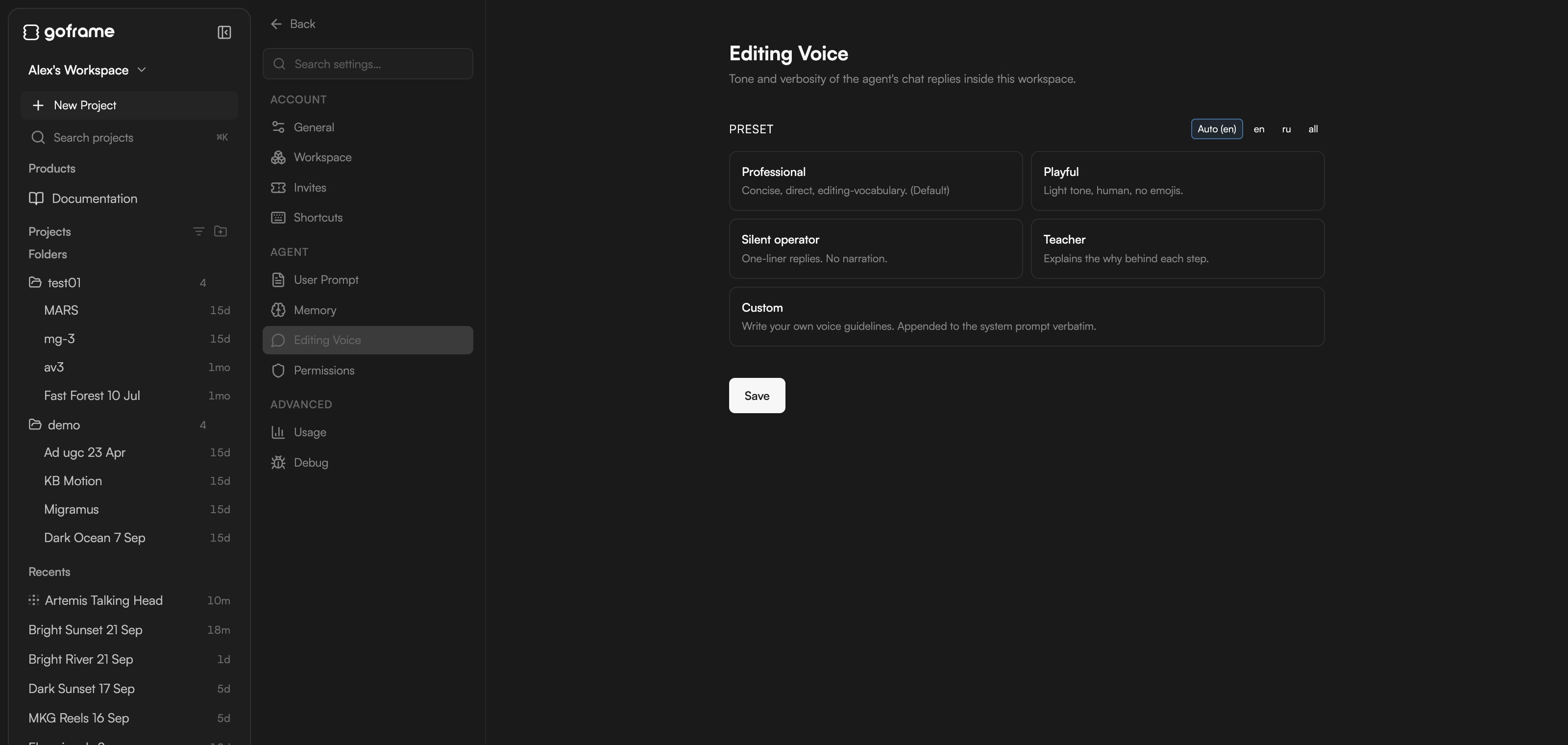
**Editing Voice** sets the tone and verbosity of the agent's chat replies in this workspace. It does not change what the agent does, only how it talks about it.
| Preset | Style |
| ------------------- | --------------------------------------------------------------------------------------- |
| **Professional** | "Concise, direct, editing-vocabulary." The default. |
| **Playful** | "Light tone, human, no emojis." |
| **Silent operator** | "One-liner replies. No narration." Good once you trust the agent and want less reading. |
| **Teacher** | "Explains the why behind each step." Good while you learn the editor. |
| **Custom** | "Write your own voice guidelines. Appended to the system prompt verbatim." |
Use the **Preset** filter (**Auto (en)**, **en**, **ru** or **all**) to show the presets for one language, pick a card and click **Save**.
Persistent memory holds up to 200 entries. Type `/remember` in the chat to audit it: the agent surfaces stale entries, duplicates and project notes worth promoting to workspace scope, and changes nothing without your approval.
When you create a project you choose its memory scope: **Workspace memory** (inherit everything), **Project-only** (start clean, for a different brand or confidential work) or **Hybrid** (inherit, but let project entries override matching ones). See [Home and projects](/editor/home-and-projects).
### Session notes
Inside a project, below project memory, **Session notes** is a structured summary the agent writes for itself after the first few turns in a project and keeps updated ("updated 5m ago · turn 12"). It survives `/compact`, so the agent picks up where it left off. Click **Clear notes** to reset it; a copy is downloaded first and the agent rebuilds the notes on the next turns.
## Editing Voice
**Editing Voice** sets the tone and verbosity of the agent's chat replies in this workspace. It does not change what the agent does, only how it talks about it.
| Preset | Style |
| ------------------- | --------------------------------------------------------------------------------------- |
| **Professional** | "Concise, direct, editing-vocabulary." The default. |
| **Playful** | "Light tone, human, no emojis." |
| **Silent operator** | "One-liner replies. No narration." Good once you trust the agent and want less reading. |
| **Teacher** | "Explains the why behind each step." Good while you learn the editor. |
| **Custom** | "Write your own voice guidelines. Appended to the system prompt verbatim." |
Use the **Preset** filter (**Auto (en)**, **en**, **ru** or **all**) to show the presets for one language, pick a card and click **Save**.
 ## Permissions
**Permissions** holds cost-aware auto-approval rules that apply to every project in this workspace: **Always ask for anything above (USD)**, **Monthly spend cap (USD, 0 = no cap)**, and per-skill **Auto-approve** and **Always ask** lists. The full walkthrough is in [Review proposals and approve actions](/editor/proposals-and-permissions).
## Usage
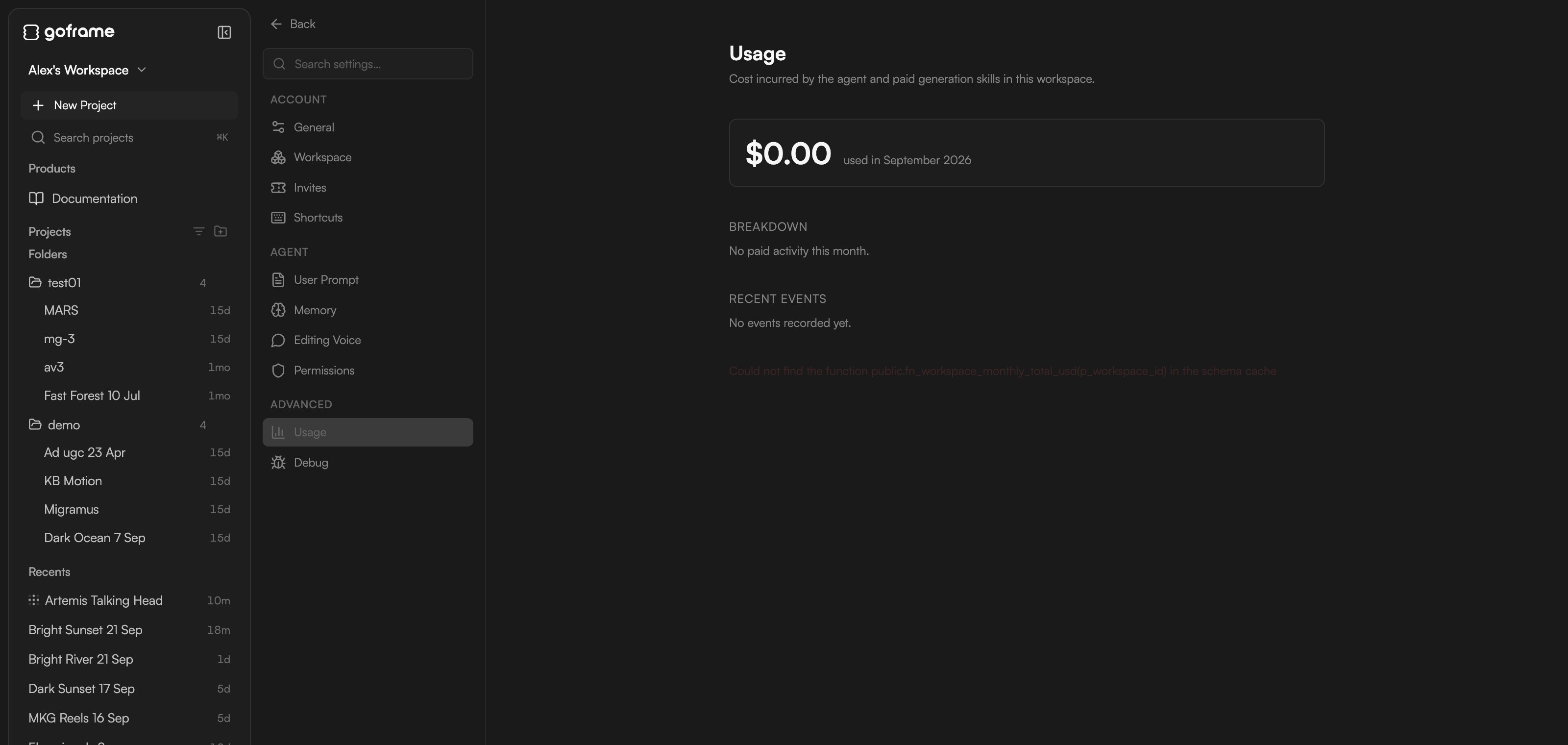
**Settings → Advanced → Usage** shows what the agent and paid generation skills used in this workspace this month (for example **\$0.00 used in September 2026**), a **Breakdown** and a list of **Recent events**. Use it to see which skills consume the most credits. Your remaining balance is always in the project footer next to the ⚡ icon; see [Plans and credits](/editor/plans-and-credits).
## Permissions
**Permissions** holds cost-aware auto-approval rules that apply to every project in this workspace: **Always ask for anything above (USD)**, **Monthly spend cap (USD, 0 = no cap)**, and per-skill **Auto-approve** and **Always ask** lists. The full walkthrough is in [Review proposals and approve actions](/editor/proposals-and-permissions).
## Usage
**Settings → Advanced → Usage** shows what the agent and paid generation skills used in this workspace this month (for example **\$0.00 used in September 2026**), a **Breakdown** and a list of **Recent events**. Use it to see which skills consume the most credits. Your remaining balance is always in the project footer next to the ⚡ icon; see [Plans and credits](/editor/plans-and-credits).
 ## Debug
**Settings → Advanced → Debug** lists live agent state: the current session, chat mode, whether plan mode is armed and context usage. You will not need it day to day; support may ask you to read values from here when something misbehaves. See [Troubleshooting](/editor/troubleshooting).
## Continue
* [Meet GoFrame Editor Agent](/editor/agent)
* [Review proposals and approve actions](/editor/proposals-and-permissions)
* [Settings](/editor/settings)
* [Plans and credits](/editor/plans-and-credits)
## Debug
**Settings → Advanced → Debug** lists live agent state: the current session, chat mode, whether plan mode is armed and context usage. You will not need it day to day; support may ask you to read values from here when something misbehaves. See [Troubleshooting](/editor/troubleshooting).
## Continue
* [Meet GoFrame Editor Agent](/editor/agent)
* [Review proposals and approve actions](/editor/proposals-and-permissions)
* [Settings](/editor/settings)
* [Plans and credits](/editor/plans-and-credits)