> ## Documentation Index
> Fetch the complete documentation index at: https://docs.goframe.dev/llms.txt
> Use this file to discover all available pages before exploring further.
# Music and sound effects
> Generate background music, text-described sound effects and sound synced to silent footage, analyze beats, and balance audio on the timeline
GoFrame Editor Agent can score your edit three ways: generate a music bed from a style description, create a single sound effect from text, or watch a silent clip and produce audio that matches what's on screen. It can also analyze a track's beats so your cuts land on the music.
## Before you start
* **Credits.** Music costs 20 credits per generation. Sound effects and sound-from-picture show their cost on the card before the agent runs them.
* **Plan.** Music, text-to-SFX and MMAudio are available on every plan. **Mirelo AI SFX** carries the **pro** badge.
* **A clip in the Media pool** for sound-from-picture. Generated clips already are.
* **A model choice, sometimes.** If the request leaves the choice open, the agent may ask which music model to use and wait for your answer before spending credits.
## Ask the agent
### Background music (`/music-gen`)
```text theme={null}
/music-gen upbeat synthwave background track, energetic build-up
```
```text theme={null}
Add background music: warm acoustic guitar, 90 BPM, relaxed, loop-ready, 60 seconds, CassetteAI.
```
```text theme={null}
Write a short pop song about summer with these lyrics: "..." Use Minimax Music.
```
### A sound effect from text (`/voice`)
```text theme={null}
Generate a 2-second cinematic whoosh and put it on the cut into scene 2.
```
```text theme={null}
I need footsteps on a wooden floor in an empty room, 6 seconds, subtle.
```
### Sound for a silent clip (`/video-sfx`)
```text theme={null}
/video-sfx add ambient street sounds to the intro clip
```
```text theme={null}
Add sound to @drone-shot.mp4: wind, distant waves, a gull near the end. Keep it under the music.
```
 Choose models with the ✦ button in the composer or `/model`; music, sound effects and video-to-SFX each have their own section in the picker.
## Options
### Music
| Model | Best for | Length | Notes |
| --------------------------- | ------------------------------------------- | ----------- | ------------------------------------------- |
| **Minimax Music** (default) | General background music; songs with lyrics | Varies | Give lyrics in the prompt for a vocal track |
| **CassetteAI** | Loop-ready beds with fine style control | Up to 120 s | Say the exact duration you need |
| **Lyria 2** | Cinematic scores, highest musical quality | About 30 s | Good for stings and intros |
Describe genre, mood, tempo (BPM), instruments and where it sits ("under narration", "opening sting"). If you don't name a tempo, the agent picks one that fits the scene.
### Sound effects from text
**ElevenLabs SFX** generates a single effect from 0.5 to 22 seconds (5 s if you don't say). Be specific ("a dog barking loudly"), give context ("footsteps on gravel, outdoors") and a style ("8-bit game sound", "cinematic riser").
### Sound from picture
| Model | Input | Notes |
| ----------------------- | -------------------------------------------------------------------------------------------- | ----------------------------------- |
| **MMAudio** (default) | A video clip, optionally with a text hint; or text alone for an ambience bed of a set length | Sound is synced to visible action |
| **Mirelo AI SFX** (pro) | A video clip | Richer, more cinematic sound design |
Tell the agent what it should be hearing ("door slams at the end", "footsteps at walking pace") and the sync improves. For a continuous room tone with no visible source, ask for a text-only ambience bed.
## Where the result lands and what to do next
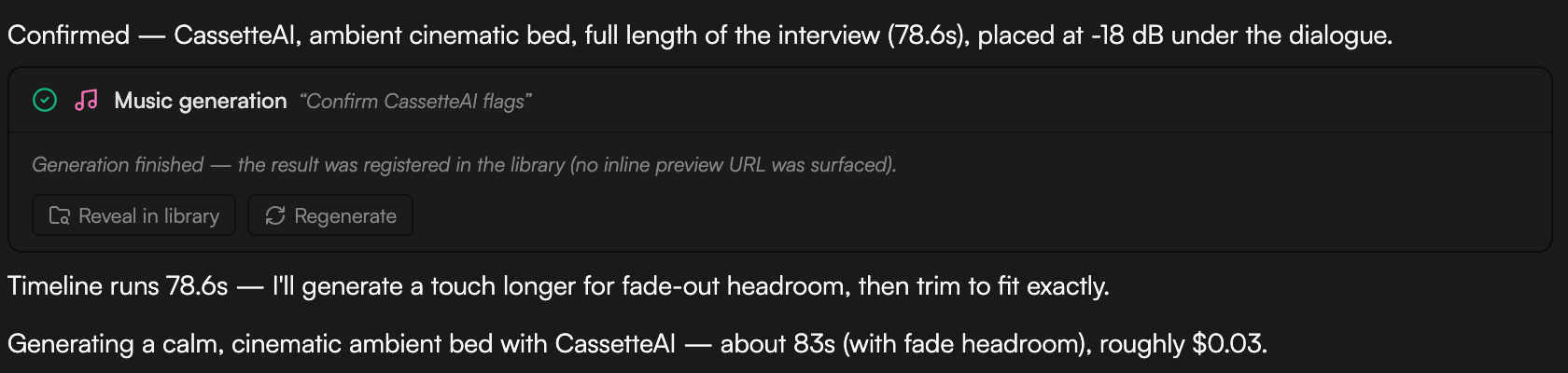
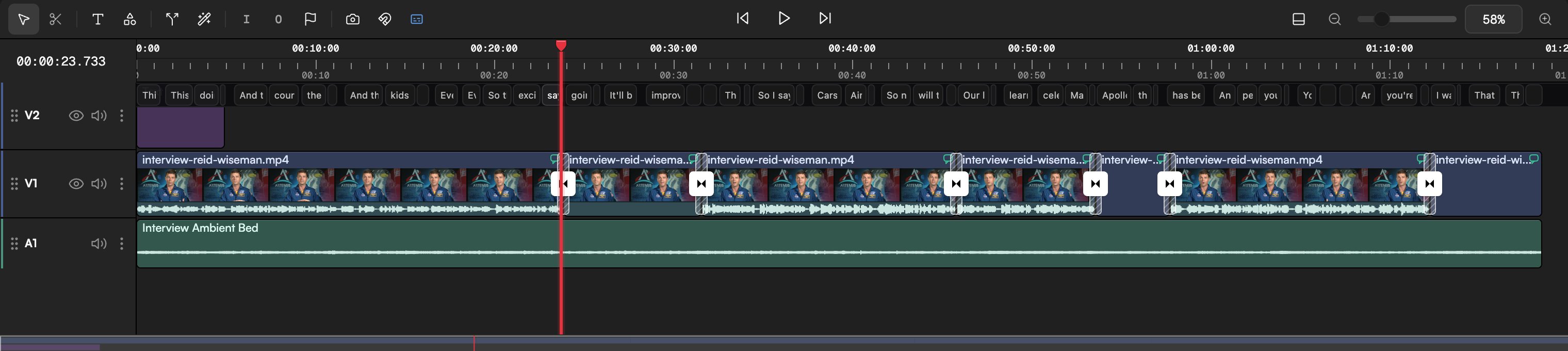
* Music and sound effects are saved to the **Media pool** as audio assets with the **Created by AI agent** badge, named for their job (for example **Interview Ambient Bed**), and placed on an audio track such as A1. A music bed under speech is typically set well below the voice (around −18 dB) with a fade-out at the end. Say "from the start" or "under scene 3" to place it, or "library only" to keep it off the timeline.
* Sound generated from a clip is a separate audio asset, lined up with the clip it was made from so it matches the picture.
* Job cards (**Music generation**, **Video sound FX**) show progress and finish with "Generation finished — the result was registered in the library", plus **Reveal in library** and **Regenerate** buttons. **Regenerate** gives you another take with the same settings.
* Balance the mix in the [Inspector](/editor/inspector): set **Volume** per clip, add audio fade in and fade out, or animate volume with the **Gain** preset and keyframes. Or just ask: "lower the music under the voiceover and fade it out over the last 3 seconds".
* Run `/beat-analyze` on the music track to get its BPM, beat timestamps, sections (intro, verse, chorus) and suggested cut points, then say "cut the montage on the beat". The `wf-montage` workflow does this end to end.
Choose models with the ✦ button in the composer or `/model`; music, sound effects and video-to-SFX each have their own section in the picker.
## Options
### Music
| Model | Best for | Length | Notes |
| --------------------------- | ------------------------------------------- | ----------- | ------------------------------------------- |
| **Minimax Music** (default) | General background music; songs with lyrics | Varies | Give lyrics in the prompt for a vocal track |
| **CassetteAI** | Loop-ready beds with fine style control | Up to 120 s | Say the exact duration you need |
| **Lyria 2** | Cinematic scores, highest musical quality | About 30 s | Good for stings and intros |
Describe genre, mood, tempo (BPM), instruments and where it sits ("under narration", "opening sting"). If you don't name a tempo, the agent picks one that fits the scene.
### Sound effects from text
**ElevenLabs SFX** generates a single effect from 0.5 to 22 seconds (5 s if you don't say). Be specific ("a dog barking loudly"), give context ("footsteps on gravel, outdoors") and a style ("8-bit game sound", "cinematic riser").
### Sound from picture
| Model | Input | Notes |
| ----------------------- | -------------------------------------------------------------------------------------------- | ----------------------------------- |
| **MMAudio** (default) | A video clip, optionally with a text hint; or text alone for an ambience bed of a set length | Sound is synced to visible action |
| **Mirelo AI SFX** (pro) | A video clip | Richer, more cinematic sound design |
Tell the agent what it should be hearing ("door slams at the end", "footsteps at walking pace") and the sync improves. For a continuous room tone with no visible source, ask for a text-only ambience bed.
## Where the result lands and what to do next
* Music and sound effects are saved to the **Media pool** as audio assets with the **Created by AI agent** badge, named for their job (for example **Interview Ambient Bed**), and placed on an audio track such as A1. A music bed under speech is typically set well below the voice (around −18 dB) with a fade-out at the end. Say "from the start" or "under scene 3" to place it, or "library only" to keep it off the timeline.
* Sound generated from a clip is a separate audio asset, lined up with the clip it was made from so it matches the picture.
* Job cards (**Music generation**, **Video sound FX**) show progress and finish with "Generation finished — the result was registered in the library", plus **Reveal in library** and **Regenerate** buttons. **Regenerate** gives you another take with the same settings.
* Balance the mix in the [Inspector](/editor/inspector): set **Volume** per clip, add audio fade in and fade out, or animate volume with the **Gain** preset and keyframes. Or just ask: "lower the music under the voiceover and fade it out over the last 3 seconds".
* Run `/beat-analyze` on the music track to get its BPM, beat timestamps, sections (intro, verse, chorus) and suggested cut points, then say "cut the montage on the beat". The `wf-montage` workflow does this end to end.
 ## Do it from the Storyboard
The chat is the primary path, but the **Storyboard** can generate audio too: an empty board offers **Generate music** and **Synthesize speech**, and the prompt bar's audio type icon does the same later. The result appears as a node on the board. See [Storyboard](/editor/storyboard).
## Tips
* Veo 3 Fast, Kling 3.0 Pro, Kling O3 Pro and the Seedance models can generate their own sound when **Sound on** is set in the generation settings. You may only need music on top.
* Keep effects out of the music's frequency range. With a bass-heavy bed, ask for "crisp, bright" effects.
* One idea per music request. If you need an intro sting and a bed, ask for two generations.
* Draft with CassetteAI loops, then commission a Lyria 2 sting for the moments that matter.
## Related
* [Voiceover and text-to-speech](/editor/voiceover)
* [Generate video](/editor/generate-video)
* [Inspector: clip properties](/editor/inspector)
* [Animate clips with presets and keyframes](/editor/animation-and-keyframes)
## Do it from the Storyboard
The chat is the primary path, but the **Storyboard** can generate audio too: an empty board offers **Generate music** and **Synthesize speech**, and the prompt bar's audio type icon does the same later. The result appears as a node on the board. See [Storyboard](/editor/storyboard).
## Tips
* Veo 3 Fast, Kling 3.0 Pro, Kling O3 Pro and the Seedance models can generate their own sound when **Sound on** is set in the generation settings. You may only need music on top.
* Keep effects out of the music's frequency range. With a bass-heavy bed, ask for "crisp, bright" effects.
* One idea per music request. If you need an intro sting and a bed, ask for two generations.
* Draft with CassetteAI loops, then commission a Lyria 2 sting for the moments that matter.
## Related
* [Voiceover and text-to-speech](/editor/voiceover)
* [Generate video](/editor/generate-video)
* [Inspector: clip properties](/editor/inspector)
* [Animate clips with presets and keyframes](/editor/animation-and-keyframes)