> ## Documentation Index
> Fetch the complete documentation index at: https://docs.goframe.dev/llms.txt
> Use this file to discover all available pages before exploring further.
# Skills and workflows
> The full catalog of GoFrame Editor Agent skills by group, with an example prompt for each, plus the Director pipeline and multi-step workflows
A skill is a specialized ability the agent loads for a task: generating video, editing by transcript, adding captions, analyzing beats. You rarely need to name one; describe what you want and the agent picks the right skill. This page lists every skill so you know what to ask for and how to call one directly.
## Run a skill
* **Plain language**: "add karaoke captions" runs the captions skill; "find three clips for shorts" runs a highlights edit.
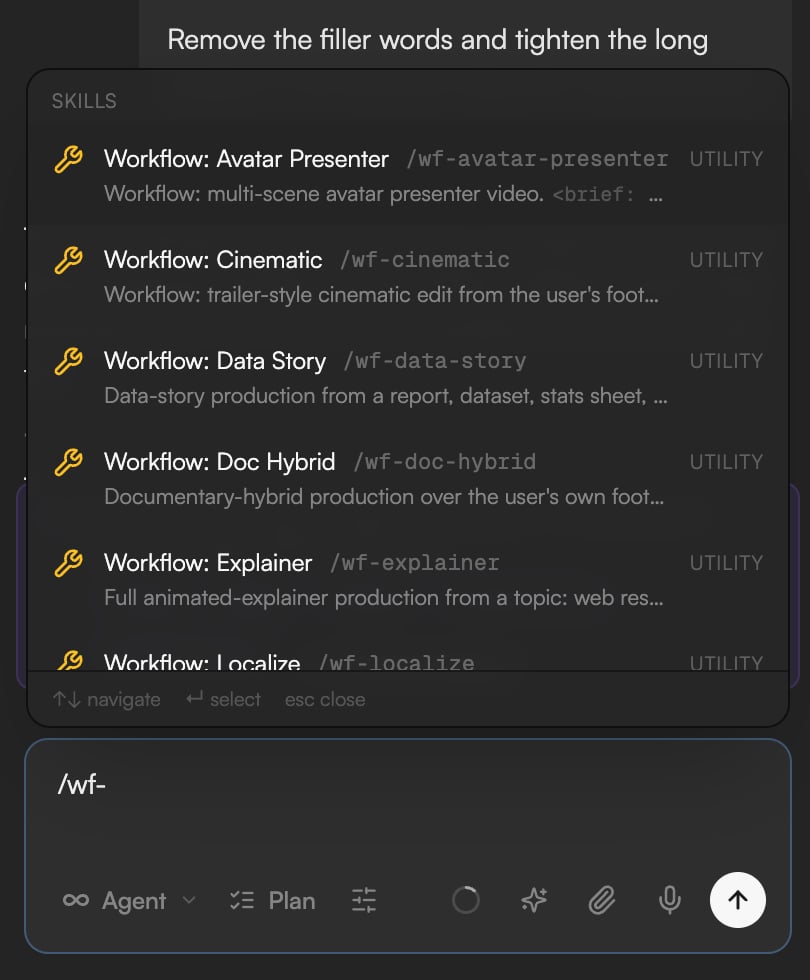
* **Slash command**: type `/` and pick from the **Skills** section of the palette, or type the name, for example `/captions karaoke-style captions for the whole video`. Each entry carries a tag for what it does (**GENERATE**, **EDIT** and so on) and a hint for the argument it takes; the words after the name become the instruction.
* Type `@` to reference a clip or asset inside the instruction; see [Write prompts, references and commands](/editor/prompting).
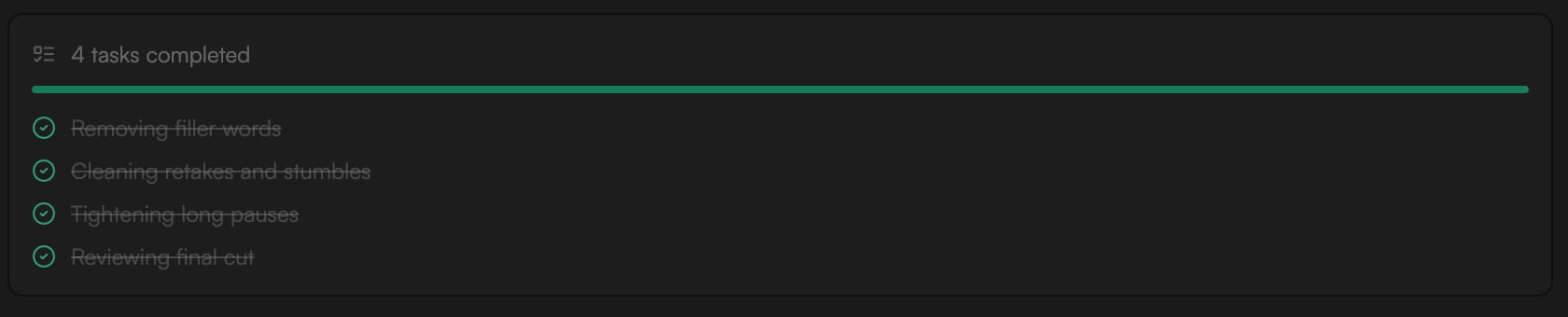
Skill activity shows up as operation rows while the run is in progress (for example **Check transcript-edit skill usage**). Paid skills announce their cost and may ask for approval; see [Review proposals and approve actions](/editor/proposals-and-permissions).
 ## Generation skills
| Skill | What it does | Example prompt |
| ------------------- | ------------------------------------------------------------------------------------------------------- | ------------------------------------------------------------------------ |
| `/avatar-video` | Creates a talking avatar video from a script, using a preset presenter or a portrait photo. | `/avatar-video presenter reads our product intro script` |
| `/director` | Runs the full creative pipeline for a video idea, from concept to export, with approvals at each stage. | `/director make a 30s teaser for our coffee brand` |
| `/image-gen` | Generates images from a text description, with optional reference images. | `/image-gen a neon-lit rainy street at night, cinematic wide shot` |
| `/image-upscale` | Increases image resolution with detail enhancement, up to 4K–10K pixels. | `/image-upscale the hero image to 4K` |
| `/motion-graph-gen` | Generates animated motion graphics (lower thirds, titles, charts, logo reveals) from a description. | `/motion-graph-gen animated lower-third with the speaker name` |
| `/music-gen` | Generates background music from a style, mood or tempo description. | `/music-gen upbeat synthwave background track, energetic build-up` |
| `/video-gen` | Generates video clips from text, an image, first and last frames, or references. | `/video-gen slow dolly-in on a mountain cabin at dawn, volumetric light` |
| `/video-sfx` | Adds synchronized sound effects to silent video clips. | `/video-sfx add ambient street sounds to the intro clip` |
| `/video-upscale` | Increases video resolution to 1080p or 4K, with optional frame-rate conversion. | `/video-upscale the final cut to 4K` |
| `/visual-identity` | Establishes a visual identity (palette, typography, motion personality) that later generations follow. | `/visual-identity moody cyberpunk, teal and magenta` |
| `/voice` | Text-to-speech voiceover with voice selection; also generates custom sound effects from text. | `/voice warm narrator voice: Welcome to the future of editing` |
Model choices and options for these skills are in [AI models](/editor/ai-models).
## Editing skills
| Skill | What it does | Example prompt |
| ------------------ | ------------------------------------------------------------------------------------------------------------------- | ------------------------------------------------------------------------- |
| `/canvas-edit` | Edits the Storyboard: creates, renames and reorders scene frames, places media and text nodes. | `/canvas-edit add a scene frame for the outro with the two sunset stills` |
| `/captions` | Adds captions built from the transcript and applies a preset style. | `/captions karaoke-style captions for the whole video` |
| `/polish` | Final pass on the timeline: cleanup, audio leveling, fades, export-readiness. | `/polish final cleanup pass on the timeline` |
| `/style-ref` | Extracts a style reference (palette, pacing, typography, mood) from an asset or link and applies it to the project. | `/style-ref match the look of the reference clip` |
| `/timeline-edit` | Edits timeline structure: cuts, order, transitions, text and shapes, animations. | `/timeline-edit tighten all cuts and add crossfades between scenes` |
| `/transcript-edit` | Edits the video by editing the transcript: fillers, pauses, repeated takes, highlights, duration trims. | `/transcript-edit remove filler words and long pauses` |
| `/undo` | Reverts the last agent actions on the timeline and library using project versions. | `/undo` |
## Analysis skills
| Skill | What it does | Example prompt |
| --------------------- | ------------------------------------------------------------------------------------------------------------------- | ------------------------------------------------------------------ |
| `/beat-analyze` | Analyzes a music track for BPM, beat timestamps, sections (intro, verse, chorus) and beat-aligned cut points. | `/beat-analyze the background music track` |
| `/explain` | Dry run: explains what the agent would do next without doing it. | `/explain how would you restructure the intro?` |
| `/storyboard-preview` | Builds a single-page storyboard of the project: one card per shot with reference image, action, dialogue and notes. | `/storyboard-preview generate a storyboard of the current project` |
| `/visual` | Looks at your footage: extracts and inspects frames, finds moments, checks composition. | `/visual does the title card overlap the speaker?` |
## Utility skills
| Skill | What it does | Example prompt |
| ------------------- | ------------------------------------------------------------------------------------------------------------------------- | ------------------------------------------------------ |
| `/compact` | Resets the chat context while keeping project state, memory and session notes. | `/compact` |
| `/export-video` | Exports the current timeline as a video file. | `/export-video render the current timeline` |
| `/library-intake` | Batch-imports and tags a folder or list of files into the Media pool. | `/library-intake import and tag the new footage` |
| `/media-downloader` | Searches and downloads stock images and video from Pexels, Pixabay, Unsplash and Storyblocks. | `/media-downloader find 3 aerial city timelapse clips` |
| `/remember` | Audits persistent memory: surfaces stale entries, duplicates and candidates to promote. Changes nothing without approval. | `/remember update project memories` |
| `/skillify` | Turns the current session into a reusable workflow skill saved to memory. | `/skillify save this workflow as a reusable skill` |
## Workflows
Workflows chain several skills into a complete production with checkpoints for your approval. Give them the source material and the goal in one message.
| Workflow | What it produces | Example prompt |
| ----------------------- | ----------------------------------------------------------------------------------------------------------------------------- | --------------------------------------------------------------------------------- |
| `/wf-avatar-presenter` | A multi-scene avatar presenter video from a script. | `/wf-avatar-presenter turn this onboarding script into a 3-scene presenter video` |
| `/wf-cinematic` | A trailer-style cinematic edit from your footage. | `/wf-cinematic make a 45s trailer from the travel clips` |
| `/wf-data-story` | A data story from a report, dataset or dashboard brief, built around one takeaway with animated charts. | `/wf-data-story explain the Q3 numbers in the attached sheet` |
| `/wf-doc-hybrid` | A documentary-style piece over your own footage, mixing source material with generated inserts where needed. | `/wf-doc-hybrid build a 2-minute mini-doc from these interviews` |
| `/wf-explainer` | A full animated explainer: concept options, narration script, scenes, voiceover and motion graphics. | `/wf-explainer a 60s explainer on how solar panels work` |
| `/wf-localize` | The same video in another language: reviewed translation, re-voiced narration (preset voice or consented clone) and captions. | `/wf-localize make a Spanish version of this video` |
| `/wf-montage` | A music-first montage cut to the beat. | `/wf-montage cut the wedding clips to the attached track` |
| `/wf-podcast-repurpose` | Short clips and highlights from a podcast episode. | `/wf-podcast-repurpose pull 5 clips for social from this episode` |
| `/wf-promo` | A product promo from a landing page: brand kit and real assets extracted from the site, promo directions, then the edit. | `/wf-promo make a 30s promo from https://example.com` |
| `/wf-screen-demo` | A polished screen demo: cleanup, zooms, callouts, captions. | `/wf-screen-demo polish this screen recording of the new dashboard` |
| `/wf-social-clips` | A batch of social clips from a long video. | `/wf-social-clips slice this webinar into vertical shorts` |
| `/wf-talking-head` | A cleaned-up talking-head recording: pauses and fillers removed, captions, optional music and graphics. | `/wf-talking-head tighten this recording and add captions` |
## Generation skills
| Skill | What it does | Example prompt |
| ------------------- | ------------------------------------------------------------------------------------------------------- | ------------------------------------------------------------------------ |
| `/avatar-video` | Creates a talking avatar video from a script, using a preset presenter or a portrait photo. | `/avatar-video presenter reads our product intro script` |
| `/director` | Runs the full creative pipeline for a video idea, from concept to export, with approvals at each stage. | `/director make a 30s teaser for our coffee brand` |
| `/image-gen` | Generates images from a text description, with optional reference images. | `/image-gen a neon-lit rainy street at night, cinematic wide shot` |
| `/image-upscale` | Increases image resolution with detail enhancement, up to 4K–10K pixels. | `/image-upscale the hero image to 4K` |
| `/motion-graph-gen` | Generates animated motion graphics (lower thirds, titles, charts, logo reveals) from a description. | `/motion-graph-gen animated lower-third with the speaker name` |
| `/music-gen` | Generates background music from a style, mood or tempo description. | `/music-gen upbeat synthwave background track, energetic build-up` |
| `/video-gen` | Generates video clips from text, an image, first and last frames, or references. | `/video-gen slow dolly-in on a mountain cabin at dawn, volumetric light` |
| `/video-sfx` | Adds synchronized sound effects to silent video clips. | `/video-sfx add ambient street sounds to the intro clip` |
| `/video-upscale` | Increases video resolution to 1080p or 4K, with optional frame-rate conversion. | `/video-upscale the final cut to 4K` |
| `/visual-identity` | Establishes a visual identity (palette, typography, motion personality) that later generations follow. | `/visual-identity moody cyberpunk, teal and magenta` |
| `/voice` | Text-to-speech voiceover with voice selection; also generates custom sound effects from text. | `/voice warm narrator voice: Welcome to the future of editing` |
Model choices and options for these skills are in [AI models](/editor/ai-models).
## Editing skills
| Skill | What it does | Example prompt |
| ------------------ | ------------------------------------------------------------------------------------------------------------------- | ------------------------------------------------------------------------- |
| `/canvas-edit` | Edits the Storyboard: creates, renames and reorders scene frames, places media and text nodes. | `/canvas-edit add a scene frame for the outro with the two sunset stills` |
| `/captions` | Adds captions built from the transcript and applies a preset style. | `/captions karaoke-style captions for the whole video` |
| `/polish` | Final pass on the timeline: cleanup, audio leveling, fades, export-readiness. | `/polish final cleanup pass on the timeline` |
| `/style-ref` | Extracts a style reference (palette, pacing, typography, mood) from an asset or link and applies it to the project. | `/style-ref match the look of the reference clip` |
| `/timeline-edit` | Edits timeline structure: cuts, order, transitions, text and shapes, animations. | `/timeline-edit tighten all cuts and add crossfades between scenes` |
| `/transcript-edit` | Edits the video by editing the transcript: fillers, pauses, repeated takes, highlights, duration trims. | `/transcript-edit remove filler words and long pauses` |
| `/undo` | Reverts the last agent actions on the timeline and library using project versions. | `/undo` |
## Analysis skills
| Skill | What it does | Example prompt |
| --------------------- | ------------------------------------------------------------------------------------------------------------------- | ------------------------------------------------------------------ |
| `/beat-analyze` | Analyzes a music track for BPM, beat timestamps, sections (intro, verse, chorus) and beat-aligned cut points. | `/beat-analyze the background music track` |
| `/explain` | Dry run: explains what the agent would do next without doing it. | `/explain how would you restructure the intro?` |
| `/storyboard-preview` | Builds a single-page storyboard of the project: one card per shot with reference image, action, dialogue and notes. | `/storyboard-preview generate a storyboard of the current project` |
| `/visual` | Looks at your footage: extracts and inspects frames, finds moments, checks composition. | `/visual does the title card overlap the speaker?` |
## Utility skills
| Skill | What it does | Example prompt |
| ------------------- | ------------------------------------------------------------------------------------------------------------------------- | ------------------------------------------------------ |
| `/compact` | Resets the chat context while keeping project state, memory and session notes. | `/compact` |
| `/export-video` | Exports the current timeline as a video file. | `/export-video render the current timeline` |
| `/library-intake` | Batch-imports and tags a folder or list of files into the Media pool. | `/library-intake import and tag the new footage` |
| `/media-downloader` | Searches and downloads stock images and video from Pexels, Pixabay, Unsplash and Storyblocks. | `/media-downloader find 3 aerial city timelapse clips` |
| `/remember` | Audits persistent memory: surfaces stale entries, duplicates and candidates to promote. Changes nothing without approval. | `/remember update project memories` |
| `/skillify` | Turns the current session into a reusable workflow skill saved to memory. | `/skillify save this workflow as a reusable skill` |
## Workflows
Workflows chain several skills into a complete production with checkpoints for your approval. Give them the source material and the goal in one message.
| Workflow | What it produces | Example prompt |
| ----------------------- | ----------------------------------------------------------------------------------------------------------------------------- | --------------------------------------------------------------------------------- |
| `/wf-avatar-presenter` | A multi-scene avatar presenter video from a script. | `/wf-avatar-presenter turn this onboarding script into a 3-scene presenter video` |
| `/wf-cinematic` | A trailer-style cinematic edit from your footage. | `/wf-cinematic make a 45s trailer from the travel clips` |
| `/wf-data-story` | A data story from a report, dataset or dashboard brief, built around one takeaway with animated charts. | `/wf-data-story explain the Q3 numbers in the attached sheet` |
| `/wf-doc-hybrid` | A documentary-style piece over your own footage, mixing source material with generated inserts where needed. | `/wf-doc-hybrid build a 2-minute mini-doc from these interviews` |
| `/wf-explainer` | A full animated explainer: concept options, narration script, scenes, voiceover and motion graphics. | `/wf-explainer a 60s explainer on how solar panels work` |
| `/wf-localize` | The same video in another language: reviewed translation, re-voiced narration (preset voice or consented clone) and captions. | `/wf-localize make a Spanish version of this video` |
| `/wf-montage` | A music-first montage cut to the beat. | `/wf-montage cut the wedding clips to the attached track` |
| `/wf-podcast-repurpose` | Short clips and highlights from a podcast episode. | `/wf-podcast-repurpose pull 5 clips for social from this episode` |
| `/wf-promo` | A product promo from a landing page: brand kit and real assets extracted from the site, promo directions, then the edit. | `/wf-promo make a 30s promo from https://example.com` |
| `/wf-screen-demo` | A polished screen demo: cleanup, zooms, callouts, captions. | `/wf-screen-demo polish this screen recording of the new dashboard` |
| `/wf-social-clips` | A batch of social clips from a long video. | `/wf-social-clips slice this webinar into vertical shorts` |
| `/wf-talking-head` | A cleaned-up talking-head recording: pauses and fillers removed, captions, optional music and graphics. | `/wf-talking-head tighten this recording and add captions` |
 ## The Director pipeline
`/director` runs a six-stage pipeline shown as a stepper in the chat: **Concept → Structure → Draft → Refine → Polish → Export**. Each stage ends with something to approve: concept options, an outline, a rough cut, then refinements and a final polish before export. Use **Request changes** on any plan card to steer it. Director runs work with the Storyboard for generated stills and clips; see [Storyboard](/editor/storyboard).
## Save your own workflow
When a session went well, type `/skillify` to turn it into a reusable skill the agent can run again on the next project. Type `/remember` to review what the agent has memorized and clean up stale entries. Both are covered in [Agent rules, memory and voice](/editor/agent-settings).
## Continue
* [Write prompts, references and commands](/editor/prompting)
* [AI models](/editor/ai-models)
* [Generate video](/editor/generate-video)
* [Motion graphics](/editor/motion-graphics)
## The Director pipeline
`/director` runs a six-stage pipeline shown as a stepper in the chat: **Concept → Structure → Draft → Refine → Polish → Export**. Each stage ends with something to approve: concept options, an outline, a rough cut, then refinements and a final polish before export. Use **Request changes** on any plan card to steer it. Director runs work with the Storyboard for generated stills and clips; see [Storyboard](/editor/storyboard).
## Save your own workflow
When a session went well, type `/skillify` to turn it into a reusable skill the agent can run again on the next project. Type `/remember` to review what the agent has memorized and clean up stale entries. Both are covered in [Agent rules, memory and voice](/editor/agent-settings).
## Continue
* [Write prompts, references and commands](/editor/prompting)
* [AI models](/editor/ai-models)
* [Generate video](/editor/generate-video)
* [Motion graphics](/editor/motion-graphics)