> ## Documentation Index
> Fetch the complete documentation index at: https://docs.goframe.dev/llms.txt
> Use this file to discover all available pages before exploring further.
# Troubleshooting
> Fixes for sign-in codes, invite codes, missing projects and files, uploads, transcription, agent errors, credits, exports, saving and updates
Fixes for the problems people run into most, keyed to the message you see in the app. If none match, email [hello@goframe.dev](mailto:hello@goframe.dev) with your user id (account menu → **Copy User Id**), the project name and a screenshot of the error.
## I did not receive a sign-in code
Check the spam folder, then click **Resend**. If you asked too often, wait a minute before trying again; if the code expired, request a new one. If your Google or Yandex account uses the same email, **Continue with Google** or **Continue with Yandex** skips the code entirely. See [Sign in and beta access](/editor/sign-in-and-access).
## I signed in but see "goframe is in closed beta"
Access is invite-only for now. Enter a code in **Have an invite code?** (format GF-XXXX-XXXX) and click **Activate**, or **Join the waitlist** to get a position. If a code is rejected as already used or expired, ask the person who invited you for a new one from their **Settings → Invites**.
## A project is missing from Home
Check **Trash** in the sidebar, and the archived projects list. Trashed projects show how many days are left ("Nd left") and can be restored for 7 days. Also check the workspace switcher: a project created in another workspace does not appear in this one. See [Home and projects](/editor/home-and-projects).
## My clips say "File unavailable" or ask me to relink
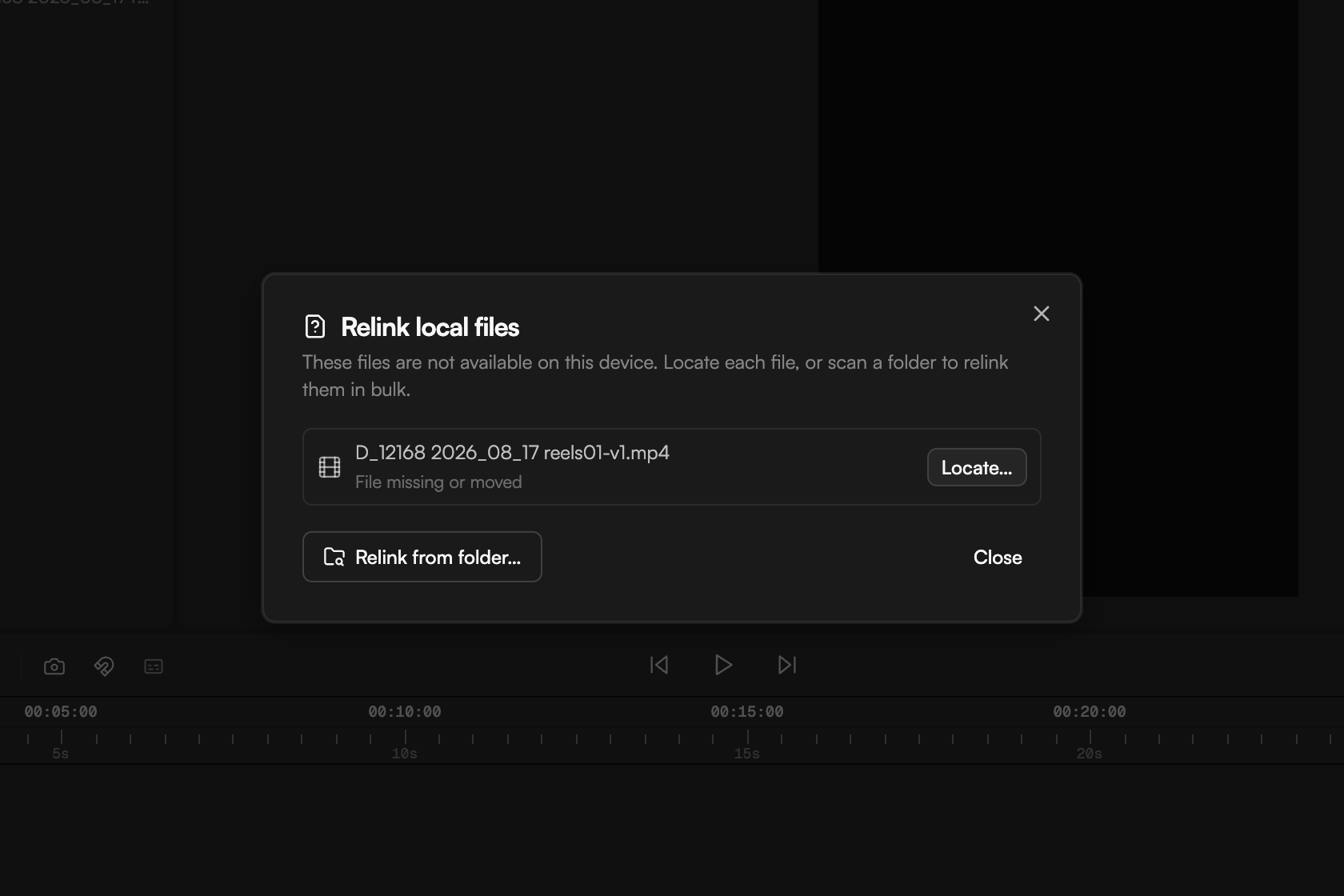
Local-only files live on your computer, so they are unavailable on another device or after they move. The Media pool shows a banner ("6 local files are unavailable — Relink…") and a **relink** badge on each affected tile. Click **Relink…** to open **Relink local files**: each row reads "File missing or moved" with a **Locate…** button, and **Relink from folder…** scans a folder to relink them in bulk (Chrome and Edge). To avoid this, right-click the asset and turn on **Cloud Sync**, or enable **Auto cloud sync** in the Media pool. See [Import media](/editor/import-media).
 ## An upload fails or shows "Upload error"
Confirm the file is under 50 GB and in a supported format (see [Supported formats and limits](/editor/formats-and-limits)). For a stubborn file, re-export it from its source and import again. Uploads run in the **Background tasks** popover in the top bar; keep the tab open until the status reads **Uploaded**.
## Transcription failed or says "No speech detected"
"No speech detected" and "No audio track" mean the transcriber found nothing to transcribe; check that the clip has audible speech and that the right language is set in the transcription settings (or use Auto-detect). "Transcription failed" is worth one retry with **Re-transcribe**. Media longer than 24 hours cannot be transcribed, and only 3 files transcribe at once; the rest wait for a free slot. See [Transcribe media](/editor/transcription).
## The agent says it is busy
Only one agent run can be active per project. A busy message means a run is in progress, possibly started by a collaborator. Wait for **Agent run finished**, or press `Esc` to cancel your own run (the status line reads "esc to cancel" while it works). Switching chats is also blocked mid-run.
## The agent shows "Waiting for your approval" and nothing happens
The agent is paused on a card that needs your answer: an edit plan (**Apply plan** / **Revise**), a permission request (**Approve once**, **Always**, **Deny**) or a plan awaiting **Approve & run**. Scroll up in the chat to find it. To auto-approve routine actions, adjust **Settings → Agent → Permissions**. See [Review proposals and approve actions](/editor/proposals-and-permissions).
## The agent lost the connection
After about 30 minutes of inactivity the agent session expires and reconnects on its own the next time you send a prompt. If the chat says the connection was interrupted and the response could not be recovered, the last answer was lost: send the prompt again. If it stays stuck, reload the page.
## "Insufficient Credits" or "Out of credits"
The next action costs more than the workspace balance. Click **Top Up Credits**, or click the credits counter (⚡) in the project footer. Packs are unavailable on Free, so upgrade or wait for the monthly refresh. See [Plans and credits](/editor/plans-and-credits).
## "Daily AI prompt limit reached"
Free workspaces get 20 agent prompts a day, Creator 200. The message shows today's count and when it resets. Upgrade to continue now, or come back tomorrow. Timeline editing, captions and exports keep working.
## The export is slow or stuck
Rendering happens in your browser tab, and hidden tabs are throttled, so bring the tab to the front. Captions and motion graphics are burned in frame by frame; the dialog warns "Captions will be burned in frame by frame — this export is slower than usual." Turn on **MG optimization** in the Media pool so motion graphics are prepared ahead of time. For long projects, try **Medium** quality or a lower resolution.
## A transparent (ProRes) export will not start
ProRes 4444 encodes in memory; when the range does not fit, the dialog tells you and **Export** stays disabled. Export in parts using markers in the **Duration** dropdown, lower the resolution or frame rate, or switch to **WebM**. Transparent export also needs a paid plan and WebM or MOV; MP4 cannot carry an alpha channel. See [Export video](/editor/export).
## My export has no sound or has a watermark
A silent export usually means a source file was unavailable during the render: relink it and export again. A "Made with Goframe" mark is expected on the Free plan; upgrade to remove it.
## The save status says Offline, Couldn't save or Paused
* **Offline — changes stored locally**: keep the tab open; changes sync when the connection returns.
* **Couldn't save — click to retry**: click the status. If it keeps failing, copy any important text out, then reload.
* **Paused — project updated in another tab, reload**: the same project is open elsewhere. Close the other tab and reload this one.
If you lost work, open **Version history** and restore an earlier state. See [Version history and autosave](/editor/version-history).
## I see "New Version Available"
A new build of GoFrame Editor is out. Wait for the save status to show **Saved**, then click **Refresh page**. Nothing in your project is lost.
## Something changed on the timeline and I did not do it
Collaborators' edits appear live, and agent edits arrive as **Timeline changes** cards. Open **Version history** (the clock icon in the top bar): every entry names its author and shows change chips, and **Before AI** entries step back before an agent edit. Restoring keeps the current state in history, so it is safe to try. See [Share and collaborate](/editor/share-and-collaborate).
## Continue
* [Supported formats and limits](/editor/formats-and-limits)
* [Version history and autosave](/editor/version-history)
* [Plans and credits](/editor/plans-and-credits)
* [Import media](/editor/import-media)
## An upload fails or shows "Upload error"
Confirm the file is under 50 GB and in a supported format (see [Supported formats and limits](/editor/formats-and-limits)). For a stubborn file, re-export it from its source and import again. Uploads run in the **Background tasks** popover in the top bar; keep the tab open until the status reads **Uploaded**.
## Transcription failed or says "No speech detected"
"No speech detected" and "No audio track" mean the transcriber found nothing to transcribe; check that the clip has audible speech and that the right language is set in the transcription settings (or use Auto-detect). "Transcription failed" is worth one retry with **Re-transcribe**. Media longer than 24 hours cannot be transcribed, and only 3 files transcribe at once; the rest wait for a free slot. See [Transcribe media](/editor/transcription).
## The agent says it is busy
Only one agent run can be active per project. A busy message means a run is in progress, possibly started by a collaborator. Wait for **Agent run finished**, or press `Esc` to cancel your own run (the status line reads "esc to cancel" while it works). Switching chats is also blocked mid-run.
## The agent shows "Waiting for your approval" and nothing happens
The agent is paused on a card that needs your answer: an edit plan (**Apply plan** / **Revise**), a permission request (**Approve once**, **Always**, **Deny**) or a plan awaiting **Approve & run**. Scroll up in the chat to find it. To auto-approve routine actions, adjust **Settings → Agent → Permissions**. See [Review proposals and approve actions](/editor/proposals-and-permissions).
## The agent lost the connection
After about 30 minutes of inactivity the agent session expires and reconnects on its own the next time you send a prompt. If the chat says the connection was interrupted and the response could not be recovered, the last answer was lost: send the prompt again. If it stays stuck, reload the page.
## "Insufficient Credits" or "Out of credits"
The next action costs more than the workspace balance. Click **Top Up Credits**, or click the credits counter (⚡) in the project footer. Packs are unavailable on Free, so upgrade or wait for the monthly refresh. See [Plans and credits](/editor/plans-and-credits).
## "Daily AI prompt limit reached"
Free workspaces get 20 agent prompts a day, Creator 200. The message shows today's count and when it resets. Upgrade to continue now, or come back tomorrow. Timeline editing, captions and exports keep working.
## The export is slow or stuck
Rendering happens in your browser tab, and hidden tabs are throttled, so bring the tab to the front. Captions and motion graphics are burned in frame by frame; the dialog warns "Captions will be burned in frame by frame — this export is slower than usual." Turn on **MG optimization** in the Media pool so motion graphics are prepared ahead of time. For long projects, try **Medium** quality or a lower resolution.
## A transparent (ProRes) export will not start
ProRes 4444 encodes in memory; when the range does not fit, the dialog tells you and **Export** stays disabled. Export in parts using markers in the **Duration** dropdown, lower the resolution or frame rate, or switch to **WebM**. Transparent export also needs a paid plan and WebM or MOV; MP4 cannot carry an alpha channel. See [Export video](/editor/export).
## My export has no sound or has a watermark
A silent export usually means a source file was unavailable during the render: relink it and export again. A "Made with Goframe" mark is expected on the Free plan; upgrade to remove it.
## The save status says Offline, Couldn't save or Paused
* **Offline — changes stored locally**: keep the tab open; changes sync when the connection returns.
* **Couldn't save — click to retry**: click the status. If it keeps failing, copy any important text out, then reload.
* **Paused — project updated in another tab, reload**: the same project is open elsewhere. Close the other tab and reload this one.
If you lost work, open **Version history** and restore an earlier state. See [Version history and autosave](/editor/version-history).
## I see "New Version Available"
A new build of GoFrame Editor is out. Wait for the save status to show **Saved**, then click **Refresh page**. Nothing in your project is lost.
## Something changed on the timeline and I did not do it
Collaborators' edits appear live, and agent edits arrive as **Timeline changes** cards. Open **Version history** (the clock icon in the top bar): every entry names its author and shows change chips, and **Before AI** entries step back before an agent edit. Restoring keeps the current state in history, so it is safe to try. See [Share and collaborate](/editor/share-and-collaborate).
## Continue
* [Supported formats and limits](/editor/formats-and-limits)
* [Version history and autosave](/editor/version-history)
* [Plans and credits](/editor/plans-and-credits)
* [Import media](/editor/import-media)